Portable but not quite a best buy

After a couple of long trips out into the country and a lot of in-city driving here are my conclusions (comparisons are to the Magellan 1440 and the Nuvi 660).
::::::::::::::::::::
What works well:
::::::::::::::::::::
1. In standard suburban driving I never once lost a signal. It takes about 25-50 seconds to find a signal on a cold start which is par for the course with other GPS units I've used.
2. The routing was pretty decent and got me to where I was trying to go. It was able to recover fairly quickly when I went off course and then re-plot a revised route fairly quickly.
3. The unit is tiny and literally fits in my front shirt pocket. I can see this as being a great walkabout unit.
4. You can charge the device from a computer or from a USB charger - a wonderful option when not using it in an automobile.
5. One touch volume change. Simply click and drag ... no need to click a separate OK button.
6. The coolest new feature with this device is its Demo mode. You simply input your target destination and then have it simulate a drive to that location. This worked great when I had to show a friend how to get to a location.
7. A speed limit warning beeps at you when you go over either a set driving speed or when you go over the speed limit for a highway. Unfortunately I could only get it to warn me on the freeway (where the speed limits are mostly well known.) However my Nuvi 660 works well even on most neighborhood streets.
8. There are a ton of safety features that can be turned on - such as audible warnings when you get near a school or place of worship. I'm not yet sure how useful this will turn out to be but its definitely a fun feature.
9. It provides lots of color schemes for both day and night displays. I just went with the defaults which were more than adequate. In particular the night time view is very clear and easy to read.
10. POIs are editable. In fact a lot about this device is user editable (incl. speed limits on streets street names etc.) This works for the occasional edit or error correction.
::::::::::::::::::::::::::::
What doesn't work well:
::::::::::::::::::::::::::::
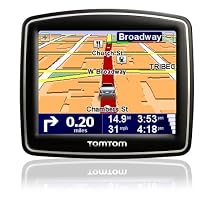
1. The screen real estate is just way too cramped. Once you factor in all the "avionics" the map display ends up being cramped. I much prefer the roomier 1440. Of course I cannot slip the 1440 into a shirt pocket.
2. In my usage I regularly rely on good voice prompts. The 140-S lets you pick from either a "human" or a "computer" voice. This choice is a problem for me since one voice can speak street names while the other cannot. It's hard to imagine why the engineers felt that this choice was relevant especially since the text to speech feature loses it's value (at least to me) when street names cannot be spoken. Also depending on the voice I chose the units changed from feet (which I liked) to yards (which I had to mentally convert).
3. The speech is on par with my Nuvi 660 and not quite close to what the 1440 can do. The words often lose a syllable and sound clipped. This is slightly better than the 660.
4. The unit does not Power On the vehicle is turned on or Power Off when the vehicle is turned off. This is a biggie.
5. The Magellan 1440's Lane Assist is much more informative. On my commute there are at least 3 interchanges off of 494 to other highways. At each such major interchange it warns me about staying on the correct lane. The 140-S seems to do so only when it thinks there is potential for confusion. I'd much prefer the extra help esp. when in an unfamiliar city.
6. The screen is difficult to see in direct sunlight but its still slightly better than the Magellan 1440.
7. The mount folds neatly into the device and is very low profile. However when removing a GPS unit I almost always just unhook the device itself rather than taking along the whole mount I've yet to see why this may be a design advantage. In addition the low profile actually makes it harder to position in my Bracketron mount.
8. The USB connector seats in snug and then is really really hard to unplug. I thought I was going to damage the connector before it finally came off.
9. The POI database is very incomplete. It couldn't find either the Best Buy Walmart or Sam's Club in Woodbury MN. Even worse it placed the Oakdale Best Buy right in the middle of I-94.
10. Strange terminology - a "roundabout" becomes a "rotary".
11. The keyboard does not default to QWERTY - and I found that a bit hard to get used to until I discovered a preference that sets this mode.
:::::::::::::::
Conclusion:
:::::::::::::::
The screen size is fairly minuscule when compared to the 4.5" 1440. A key deciding factor is which you value higher portability or readability/usability. This wins on portability but I'd recommend a larger screen otherwise.
The 1440 is my gold standard for data entry voice prompts and lane assist; and the 140-S doesn't compare as well on those counts.
(Note that while other reviewers have complained about issues when updating this device - I haven't yet connected it to my computer.)
Updated July 29:
I have noticed that I cannot "click and drag" to scroll the map. Each click takes me to the routing screen. This is a major downside for my specific usage behavior. The 1440 by contrast scrolls like a dream.
Happy Driving!
-DamodarMore detail ...


0 comments:
Post a Comment